The Flying Meat Webloghttp://flyingmeat.com/blog/2012-07-24T14:22:04-08:00Gus MuellerVoodooPad 5.0.3 Releasedurn:uuid:96662981-16ee-4a56-8184-0895fd1c00712012-07-24T14:15:54-08:002012-07-24T14:21:58-08:00VoodooPad 5.0.3 has been released for direct customers. Download the new version, or even better- use the VoodooPad ▸ Check for Updates… menu item to update to the latest version. The App Store version of VP 5.0.3 was submitted yesterday as well, and hopefully Apple won't take too long to review and release it.
5.0.3 is a bug fix update, with a couple of OS X 10.8 Mountain Lion fixes in it. Release notes are available for the curious.
We've also submitted VoodooPad for iOS version 2.0.2- so that should be out sometime soon (we hope!). It has some bug fixes (including some syncing improvements folks have been waiting for), and Markdown pages are now rendered when viewing them.
Next up, VoodooPad 5.1.
]]>Acorn 3.3urn:uuid:fdd12b59-acb0-4b81-980b-34e1e14cb8f32012-07-15T09:08:49-08:002012-07-15T10:00:00-08:00Acorn 3.3 is now available! It now features support for the new Retina MacBook Pros (via a "Retina Canvas"), Smart Layer Export (if you're a web or app designer, you'll love this), selection improvements, text improvements, and more. Check out the release notes for the full details.
If you purchased it through the App Store- don't worry Acorn 3.3 coming! Eventually. Acorn is still waiting in the queue down in Cupertino and it could either be a couple of days or even weeks till it's out (we submitted Acorn 3.3 on June 25th- and we've heard that sandboxed applications now take longer to go through the review process).
HOWEVER - if you've purchased Acorn through the App Store you can easily switch to the direct version just by downloading it off our website. Acorn will figure out that you've run the App Store version and automatically register itself.
Why didn't we wait till the App Store version was approved? With 10.8 coming out soon (Acorn 3.3 also includes Gatekeeper support) and the new Retina machines - we decided we wanted folks to get their hands on this sooner rather than later.
So grab Acorn 3.3, and have fun with it.
]]>VoodooPad 5.0 Releasedurn:uuid:422c8837-1a58-4208-8a16-b96b6f6054512012-04-20T15:41:24-08:002012-04-20T16:18:08-08:00VoodooPad 5.0 has been released. It's been a long time coming, and if you're a VP fan I think you're really going to like it. VoodooPad for iOS has been updated to version 2.0 as well.
Here are some of my favorite new features:
Completely rewritten file format and sync support
With MobileMe WebDAV support about to disappear in a few months I had to completely rethink syncing for VoodooPad. The solution I came up with was to drop WebDAV support and redesign VP's file format so that it would survive 3rd party background syncing with apps like Dropbox and SugarSync. This wasn't an easy task and took up a big chunk of development. There was lots of code to change and lots of testing involved. But the end result is pretty awesome.
No more connecting to WebDAV servers and having to deal with authentication issues and strange HTTP errors. Now you can just put your VoodooPad 5 document in a Dropbox folder and VP will detect when pages have been updated. Kirstin and I even share multiple documents over Dropbox- and we can both be working on the same document at the same time. It's wonderful.
The iOS version of VoodooPad has also been updated to use this new file format as well as using Dropbox's API for syncing.
A side benefit to these changes is VP's file format is a bit more robust than previously as well. I also see it as a way of future proofing VP- if Google decides next week to introduce a Dropbox competitor, VoodooPad will probably work fine with it. Or if a new SCM like Git or Mercurial shows up tomorrow that you want to stuff VP into, it should "just work".
Improved PDF export and new ePub exporting
PDF export is a lot faster and links now work between pages. You can also export your document as an ePub file as well. This is great if you already use VoodooPad for writing books or documentation.
We've also added support to VoodooPad to create a hierarchal collection of pages which you can reference when exporting as PDF or ePub. Unsurprisingly it's called the Collections palette. In the past getting the pages in VoodooPad to come out in a certain order was always a pain- but with collections it's a piece of cake.
Scriptlet for Web, ePub, and PDF export
I'll admit that it's pretty darn geeky- but I love it. You can now write fancy JSP/PHP like tags (using JavaScript) in your pages that will be run when you export your document. As very simple example looks like this:
The current year is: <%= new Date().getFullYear() %>
I call them "half baked pages". You can generate static websites out of VoodooPad now, but you can still add dynamic elements to it.
This topic deserves its own post, so I'll just leave it at this for now.
A new To-dos palette, including official @todo support
Find all the instances of @todo: in your document. You can even configure it so that it searches for things like @fixme or any other tokens. This means that everyone who had custom scripts for doing this can now throw them away. The new palette is better and faster.
Markdown pages
This has been a feature request for a long time, but I was always skeptical of it. Now I love it.
You can make a new page (or set it as the default for a document) that does syntax highlighting for Markdown text. This is pretty awesome if you like to use Markdown in your documents. And when you export your document for the web, PDF, or ePub, it'll be rendered correctly for you. (You can even mix and match RTF and Markdown pages in the same document. VP will do the right thing). You can even put scriptlet tags in a Markdown page.
Completely rewritten event script system
Let's face it. The old model of "write you script in a page, go to the events palette, pick an event, pick a page to run on that event, oh and pick the right language while you are at it" kind of stinks. Instead, there are now specific pages in your document which when made, will auto fill required JavaScript methods for implementing events. It's super easy to do. Just make a page named VPDocumentEventScript, VPPageEventScript, or VPWebExportScript. The methods will then be created for you, and you just fill in the details.
How to purchase, system requirements, and all that jazz
VoodooPad is a $25 dollar upgrade from any previous version, as well as for a full purchase for a limited time. If you purchased VoodooPad directly from us on or after Jan 1, 2012 check your email- you've been sent a complementary upgrade registration number.
VoodooPad 5 requires 10.7 or later, and the iOS version requires iOS 5.1 or later.
If you have questions or run into problems- make sure to email support@flyingmeat.com.
]]>How to Make Progressive JPEGs in Acornurn:uuid:7bc783a5-4c25-46b9-99c3-bf44f6e6c50f2012-03-23T10:07:06-08:002012-03-23T10:15:59-08:00written about creating high dpi images for Safari on the new iPad (3):
"After reverse engineering the limits and then later being pointed to the documentation about the limits, a birdie dropped a hint into my inbox telling me to try using a progressive JPEG file. Within just a few minutes, several people also chimed in noticing that the large iPad hero image is a progressive JPEG. I’ve not used progressive JPEGs in years, but following the lead of the birdie and the crowd, I gave it a shot. Lo and behold, it’s indeed the ticket to large JPEG joy on the iPad Retina display."
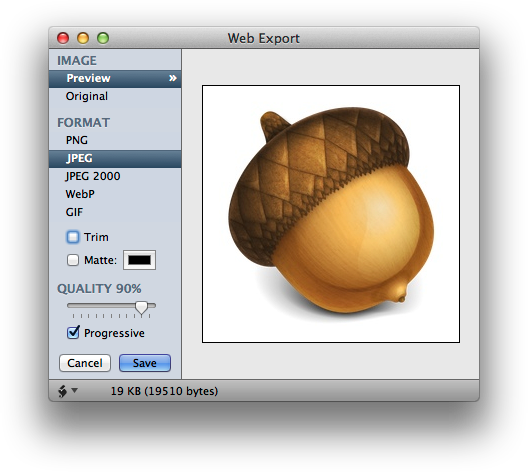
Did you know that Acorn can make progressive JPEG images? Just choose the File ▸ Web Export menu item, choose JPEG for the file format and click on the Progressive button:
And now you can display big JPEG images for Safari on your retina iOS devices!
]]>BC Image Unitsurn:uuid:52f63ea4-cc7a-4698-a013-8287358ef1172012-03-11T17:13:10-08:002012-03-11T17:16:57-08:00BC Image Unit.
There's some interesting color adjustment and effects in there, but some of the stylize ones are what really caught my eye. Noisyfier, Sketch and Dabs Painting look pretty neat on photographs.
]]>A Raindrop for Acornurn:uuid:b9acad48-64d5-4de4-90a8-073da99769dc2012-01-18T10:15:38-08:002012-01-18T10:20:09-08:00 A Raindrop for Acorn
Adam Preble has written a nice little extension for CloudApp:
CloudApp is one of my favorite tools for sharing images quickly, and I also use Acorn quite a bit for quick image editing tasks. I’ve been wanting a quick way to upload a snapshot of what I’ve got in Acorn using CloudApp, so tonight I wrote AcornRaindrop.
It's open source, and you can download it off the project page as well.
]]>Acorn 3.1urn:uuid:6645b909-74ba-4913-beb6-5ca18211e37f2011-09-19T13:12:17-08:002011-09-19T13:15:14-08:00download Acorn 3.1 right now.
Full release notes are available. Acorn 3.1 is mostly about bug fixes, and adding native 10.7 features like full screen support + autosave and versions (which you can turn on in the preferences). We also managed to sneak in color management as well.
]]>FlySketch 1.7.1urn:uuid:4f64df34-7fc2-4213-829c-a7a5b1b1c5d92011-07-28T11:10:09-08:002011-07-28T11:15:52-08:00FlySketch 1.7.1, which fixes a crashing bug when running on 10.7 Lion. FlySketch 1.7.1 requires 10.6 or later.
We've submitted this update to the Mac App Store as well, but Apple rejected it (even though this update only contained bug fixes). We've appealed the decision and hopefully we can get things resolved with Apple soon.
]]>OS X 10.7 Lion Compatibilityurn:uuid:53cb292a-ae60-4aee-809e-6bdc2c18626a2011-07-21T10:27:53-08:002012-03-11T17:17:03-08:00
Here's the status:
Acorn 2.6.4: It has a couple of issues, but we're just about done with Acorn 2.6.5 which fixes them. You can grab the latest 2.6 build from here: http://flyingmeat.com/download/latest/
VoodooPad: There is an issue where event scripts aren't running correctly, and you can't enter fullscreen mode on 10.7. We've got these fixed for the upcoming release of 4.3.4, and you can grab a preview of it from here: http://flyingmeat.com/download/latest/
FlySketch: There's a crashing bug on 10.7 that we recently found, we've got a fix almost out for ya. You can grab a preview of FlySketch 1.7.1 (which has this fix) from here: http://flyingmeat.com/download/latest/ (10.6+ only).
If you've encountered a bug on 10.7 that we don't know about yet- make sure to let us know by email us at support@flyingmeat.com.
]]>Acorn 3.0.2 is outurn:uuid:2a4b2393-3fd4-446f-bd19-6d8bb782b6e62011-05-31T18:14:40-08:002011-05-31T18:16:40-08:00Acorn out (version 3.0.2) both for direct and App Store purchases. This release is mostly to focus on bugs, so make sure to grab it. You can read the full release notes online as well.
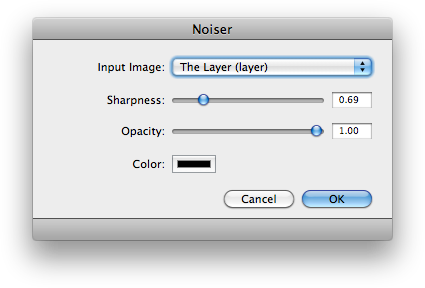
]]>Noiser, a Noise Generating Pluginurn:uuid:19614671-9800-44e6-a748-ce6ca9c425d12011-05-21T23:12:10-08:002011-05-21T23:23:33-08:00Acorn, which will add noise with a couple of different sliders for you to play with: Noiser.qtz.zip.
To install it, download Noiser.qtz.zip and unzip it (if this hasn't happened already). Then just drag and drop it on Acorn's application icon and Acorn will do the rest. Or if you want to do it manually, move it into your ~/Library/Compositions folder. The filter will then show up under the Filter ▸ Quartz Compositions ▸ Other menu. (You'll also have to restart Acorn if it was already running for the filter to show up).
Historical note for people from the future: This plugin was tested with Acorn 3.0.1.
]]>Acorn 3.0.1 is outurn:uuid:47cc8ce2-493a-4521-b691-387928768e572011-05-05T10:48:52-08:002011-05-05T10:53:44-08:00Acorn 3.0.1. If you've purchased it via the App Store check your Updates tab, otherwise use the Acorn ▸ Check for Updates menu item. Grab it while it's fresh!
It has been a busy couple of weeks, and we neglected to note here that Acorn 3.0 was released. Gus has been writing a bit about it on his personal site, so make sure to catch up on info + tips there if you haven't been reading it already. And of course the main Acorn website as well as the documentation has a ton of information for you.
]]>